
Build a Wemos D1 Mini washing machine done alert that feels the machine’s vibration with an MPU6050, knows when the wash cycle has really finished, beeps, shows the cycle time on an OLED and sends a free push notification to your phone through ntfy.sh.
Need it ready-made? Buy Ready Project
A washing machine beeps once when it is finished, and if you are in another room, on the terrace or wearing headphones, you miss it. The wet clothes then sit in the drum for hours and start to smell. Many semi-automatic and older fully-automatic machines have no Wi-Fi at all. This Wemos D1 Mini washing machine done alert fixes that without opening the machine or touching any mains wiring.
A small MPU6050 accelerometer is stuck on the top panel of the machine. The ESP8266 measures how strongly the machine is vibrating every second, follows the wash through its pauses, and decides when the cycle has really ended. Then it beeps, blinks an LED, shows the total cycle time on an OLED and sends a push notification to your phone through the free ntfy.sh service. A small web page at http://washer.local/ shows the live status from any phone or laptop on your Wi-Fi.
How It Works
- Vibration measurement: the MPU6050 is read 100 times per second over I2C (D1/D2). The code calculates the total acceleration, subtracts its slow running average (this removes gravity and any tilt of the sensor) and keeps only the shaking part. Every second it turns these 100 samples into one RMS value in milli-g (mg).
- Threshold: a second counts as active when the RMS vibration is above the threshold (25 mg by default). A long press of 3 seconds on the button runs a 10-second calibration with the machine switched off: the threshold becomes three times the idle noise plus a small margin and is stored in EEPROM.
- Start detection: one bump on the machine must not start a wash. The board goes to STARTING and needs at least 75 % active seconds during the next 60 seconds before it switches to RUNNING.
- End detection: a wash has quiet phases (filling, soaking, draining). The cycle only counts as finished after 3 minutes without vibration (
STOP_QUIET_S). Cycles shorter than 5 minutes are ignored, so moving the machine or closing the lid hard never sends a false alert. - Alert: when the cycle ends, the buzzer beeps five times, the LED blinks fast, the wash counter in EEPROM goes up and an HTTPS POST to
https://ntfy.sh/your-topicsends “Laundry is ready. Cycle time 1h12m” to your phone. If you do nothing, a reminder is sent every 15 minutes. - Acknowledge: a short press on the button, or the I took the laundry out button on the web page, stops the reminders and returns to IDLE. If a new wash starts while the alert is still active, the board notices the strong vibration and starts tracking the new cycle by itself.
- Display and web page: the OLED shows the state, the vibration level with a bar graph and threshold mark, and the running time or the number of washes. The web page refreshes every 5 seconds, and
/statusreturns JSON for Home Assistant or other tools.
Components Required
- Wemos D1 Mini (ESP8266) – 1
- MPU6050 accelerometer/gyro module (GY-521) – 1
- 0.96″ SSD1306 I2C OLED 128×64 – 1
- 5 V active buzzer – 1
- BC547 NPN transistor + 1 kΩ base resistor – 1 set
- 12 mm tactile push button – 1
- 5 mm green LED + 220 Ω resistor – 1 set
- 5 V 1 A USB adapter + micro-USB cable – 1
- Small plastic enclosure, double-sided foam tape (or magnets), perfboard and jumper wires – 1 set
Wiring Table
| Part / pin | Wemos D1 Mini pin | Notes |
|---|---|---|
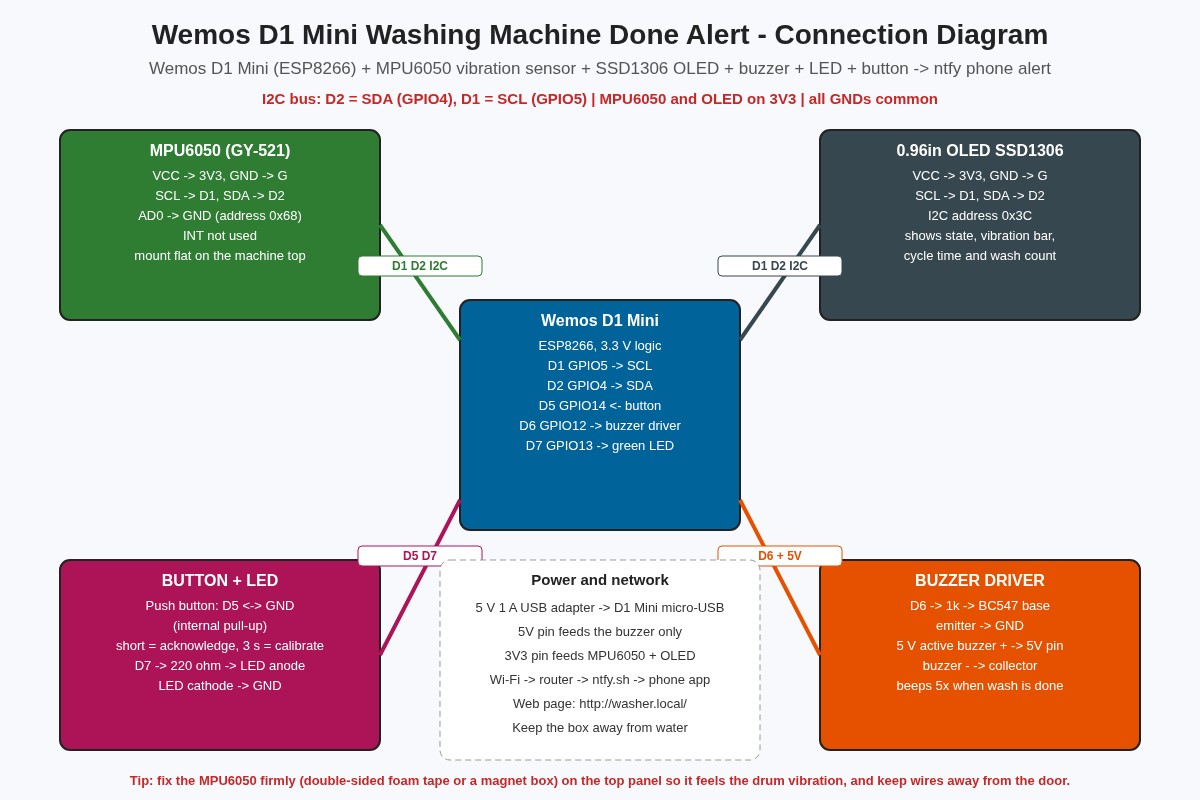
| MPU6050 VCC / GND | 3V3 / G | The GY-521 board also accepts 5 V, but 3V3 keeps the I2C lines at 3.3 V |
| MPU6050 SCL | D1 (GPIO5) | Shared I2C clock |
| MPU6050 SDA | D2 (GPIO4) | Shared I2C data |
| MPU6050 AD0 | G | I2C address 0x68; INT pin not used |
| OLED VCC / GND | 3V3 / G | SSD1306 128×64, address 0x3C |
| OLED SCL / SDA | D1 / D2 | Same bus as the MPU6050 |
| Push button | D5 (GPIO14) and G | Internal pull-up; short = acknowledge, 3 s = calibrate |
| BC547 base | D6 (GPIO12) through 1 kΩ | Emitter to G |
| Active buzzer | + to 5V, − to BC547 collector | 5 V buzzer driven by the transistor |
| Green LED | D7 (GPIO13) through 220 Ω | Cathode (short leg) to G |
| Power | Micro-USB | 5 V 1 A phone adapter near the machine, away from water |
Connection Diagram (Schematic)
The image above gives the overview. The drawing below is the exact pin-by-pin wiring; follow this one when you solder.
Set Up the ntfy Phone App
- Install the free ntfy app from the Play Store or App Store (no account needed).
- Tap + and subscribe to a topic with a long, hard-to-guess name, for example
my-flat-washer-7q4k2. Anyone who knows the topic name can read its messages, so do not use a simple word. - Put the same name in
NTFY_TOPICin the code, and replaceYOUR_WIFI_NAMEandYOUR_WIFI_PASSWORDwith your own Wi-Fi details.
Code
Install the ESP8266 board package in the Arduino IDE and select LOLIN(WEMOS) D1 R2 & mini. Install Adafruit SSD1306 and Adafruit GFX from the Library Manager. The MPU6050 is read with plain Wire commands, so no extra sensor library is needed. The sketch is non-blocking: sampling, the button, the buzzer, the web server and the display all run together in loop().
/*
  Wemos D1 Mini Washing Machine Done Alert
  MPU6050 vibration sensing + SSD1306 OLED + buzzer + LED + ntfy.sh phone alert
  Project #79 - ardiunoprojecthub.online (original code)

  Wiring (Wemos D1 Mini):
    D1 (GPIO5)  -> SCL of MPU6050 and OLED
    D2 (GPIO4)  -> SDA of MPU6050 and OLED
    D5 (GPIO14) -> push button -> GND (internal pull-up)
    D6 (GPIO12) -> 1 k -> BC547 base, 5 V active buzzer between 5 V and collector
    D7 (GPIO13) -> 220 R -> green LED -> GND
    3V3 -> VCC of MPU6050 and OLED, G -> common GND

  Board: "LOLIN(WEMOS) D1 R2 & mini" (esp8266 core 3.x)
  Libraries: Adafruit SSD1306 + Adafruit GFX (MPU6050 is read with plain Wire)
*/
#include <ESP8266WiFi.h>
#include <ESP8266WebServer.h>
#include <ESP8266mDNS.h>
#include <ESP8266HTTPClient.h>
#include <WiFiClientSecureBearSSL.h>
#include <Wire.h>
#include <EEPROM.h>
#include <Adafruit_GFX.h>
#include <Adafruit_SSD1306.h>

// ---------- user settings (replace the placeholders) ----------
const char* WIFI_SSID     = "YOUR_WIFI_NAME";
const char* WIFI_PASSWORD = "YOUR_WIFI_PASSWORD";
const char* NTFY_TOPIC    = "your-long-secret-washer-topic";   // same topic in the ntfy app
const char* HOSTNAME      = "washer";                          // http://washer.local/

const uint32_t START_CONFIRM_S = 60;    // vibration must be present ~60 s to count as a running wash
const uint32_t STOP_QUIET_S    = 180;   // 3 min of calm = cycle finished (covers soak pauses < 3 min)
const uint32_t MIN_CYCLE_S     = 300;   // ignore "cycles" shorter than 5 min (door bumps, moving the machine)
const uint32_t REMIND_EVERY_S  = 900;   // repeat phone alert every 15 min until acknowledged (0 = off)

// ---------- pins ----------
const uint8_t PIN_BTN    = D5;
const uint8_t PIN_BUZZER = D6;
const uint8_t PIN_LED    = D7;

// ---------- MPU6050 ----------
const uint8_t MPU_ADDR = 0x68;           // AD0 low
const float   LSB_PER_G = 16384.0f;      // +/-2 g range

Adafruit_SSD1306 oled(128, 64, &Wire, -1);
ESP8266WebServer server(80);

enum State : uint8_t { IDLE, STARTING, RUNNING, DONE };
const char* STATE_NAMES[] = { "IDLE", "STARTING", "RUNNING", "DONE" };
State state = IDLE;

// settings stored in EEPROM
struct Settings { uint32_t magic; float threshold; uint32_t cycles; };
Settings cfg;
const uint32_t MAGIC = 0x57A5E079;

// vibration measurement
float gravity = 1.0f;          // slow running average of |a| (removes gravity + tilt)
double sumSq = 0;              // sum of squared vibration in the current 1 s window
uint16_t nSamples = 0;
float rmsMg = 0;               // last 1 s RMS vibration in milli-g
bool mpuOk = false;

// timing / counters
uint32_t lastSampleUs = 0, lastSecondMs = 0;
uint16_t activeSecs = 0, windowSecs = 0;   // for STARTING confirmation
uint32_t quietSecs = 0;
uint32_t cycleStartMs = 0, lastCycleSecs = 0, doneAtMs = 0, lastAlertMs = 0;
uint8_t  beepsLeft = 0;
bool     muted = false;

// ---------------- MPU6050 helpers ----------------
void mpuWrite(uint8_t reg, uint8_t val) {
  Wire.beginTransmission(MPU_ADDR); Wire.write(reg); Wire.write(val); Wire.endTransmission();
}

bool mpuBegin() {
  Wire.beginTransmission(MPU_ADDR); Wire.write(0x75);            // WHO_AM_I
  if (Wire.endTransmission(false) != 0) return false;
  Wire.requestFrom(MPU_ADDR, (uint8_t)1);
  uint8_t who = Wire.available() ? Wire.read() : 0;
  if (who != 0x68 && who != 0x70 && who != 0x72) return false;   // MPU6050 / clones
  mpuWrite(0x6B, 0x01);   // wake up, clock = gyro X PLL
  mpuWrite(0x1A, 0x03);   // DLPF ~44 Hz: keeps drum vibration, removes high-frequency noise
  mpuWrite(0x1C, 0x00);   // accel +/-2 g
  return true;
}

bool mpuReadAccel(float &ax, float &ay, float &az) {
  Wire.beginTransmission(MPU_ADDR); Wire.write(0x3B);
  if (Wire.endTransmission(false) != 0) return false;
  if (Wire.requestFrom(MPU_ADDR, (uint8_t)6) != 6) return false;
  int16_t x = (Wire.read() << 8) | Wire.read();
  int16_t y = (Wire.read() << 8) | Wire.read();
  int16_t z = (Wire.read() << 8) | Wire.read();
  ax = x / LSB_PER_G; ay = y / LSB_PER_G; az = z / LSB_PER_G;
  return true;
}

// 100 Hz sampling: vibration = |a| minus its slow average, RMS over each second
void sampleVibration() {
  if (!mpuOk) return;
  uint32_t now = micros();
  if (now - lastSampleUs < 10000) return;
  lastSampleUs = now;
  float ax, ay, az;
  if (!mpuReadAccel(ax, ay, az)) return;
  float mag = sqrtf(ax * ax + ay * ay + az * az);
  gravity += 0.01f * (mag - gravity);          // ~1 s time constant
  float v = mag - gravity;
  sumSq += (double)v * v;
  nSamples++;
}

// ---------------- settings ----------------
void loadSettings() {
  EEPROM.get(0, cfg);
  if (cfg.magic != MAGIC || !(cfg.threshold > 1.0f && cfg.threshold < 500.0f)) {
    cfg.magic = MAGIC; cfg.threshold = 25.0f; cfg.cycles = 0;   // 25 mg default
  }
}
void saveSettings() { EEPROM.put(0, cfg); EEPROM.commit(); }

// ---------------- outputs ----------------
void beep(uint8_t times) { beepsLeft = times * 2; }   // handled without blocking in serviceOutputs()

void serviceOutputs() {
  static uint32_t t = 0;
  uint32_t ms = millis();
  if (beepsLeft && ms - t >= 150) {
    t = ms; beepsLeft--;
    digitalWrite(PIN_BUZZER, (beepsLeft & 1) ? HIGH : LOW);
  }
  if (!beepsLeft) digitalWrite(PIN_BUZZER, LOW);
  // LED: slow blink while running, fast blink when done, off when idle
  bool led = false;
  if (state == RUNNING || state == STARTING) led = (ms / 1000) & 1;
  else if (state == DONE) led = (ms / 200) & 1;
  digitalWrite(PIN_LED, led);
}

String fmtTime(uint32_t s) {
  char b[12];
  snprintf(b, sizeof(b), "%luh%02lum", (unsigned long)(s / 3600), (unsigned long)((s / 60) % 60));
  return String(b);
}

// ---------------- ntfy phone alert ----------------
bool sendAlert(const String &msg) {
  if (WiFi.status() != WL_CONNECTED) return false;
  BearSSL::WiFiClientSecure client;
  client.setInsecure();               // ntfy.sh over HTTPS without certificate pinning (simple home use)
  HTTPClient http;
  String url = String("https://ntfy.sh/") + NTFY_TOPIC;
  if (!http.begin(client, url)) return false;
  http.addHeader("Title", "Washing machine finished");
  http.addHeader("Priority", "high");
  http.addHeader("Tags", "basket,white_check_mark");
  int code = http.POST(msg);
  http.end();
  Serial.printf("ntfy response: %d\n", code);
  return code == 200;
}

// ---------------- state machine (runs once per second) ----------------
void everySecond() {
  rmsMg = nSamples ? sqrt(sumSq / nSamples) * 1000.0 : 0;
  sumSq = 0; nSamples = 0;
  bool active = rmsMg > cfg.threshold;

  switch (state) {
    case IDLE:
      if (active) { state = STARTING; activeSecs = 1; windowSecs = 1; }
      break;
    case STARTING:                                  // need 75 % active seconds in the window
      windowSecs++; if (active) activeSecs++;
      if (windowSecs >= START_CONFIRM_S) {
        if (activeSecs * 4 >= windowSecs * 3) {
          state = RUNNING; cycleStartMs = millis() - windowSecs * 1000UL; quietSecs = 0;
          Serial.println("Cycle started");
        } else state = IDLE;
      } else if (windowSecs - activeSecs > START_CONFIRM_S / 4) state = IDLE;  // too many quiet seconds
      break;
    case RUNNING:
      quietSecs = active ? 0 : quietSecs + 1;
      if (quietSecs >= STOP_QUIET_S) {
        lastCycleSecs = (millis() - cycleStartMs) / 1000 - STOP_QUIET_S;
        if (lastCycleSecs < MIN_CYCLE_S) { state = IDLE; Serial.println("Too short, ignored"); break; }
        state = DONE; doneAtMs = millis(); muted = false;
        cfg.cycles++; saveSettings();
        beep(5);
        String msg = "Laundry is ready. Cycle time " + fmtTime(lastCycleSecs) + ". Wash no. " + String(cfg.cycles) + ".";
        bool ok = sendAlert(msg);
        if (!ok) ok = sendAlert(msg);                    // one quick retry
        lastAlertMs = millis();
        Serial.println(ok ? "Alert sent" : "Alert failed");
      }
      break;
    case DONE:
      if (active && rmsMg > cfg.threshold * 2) {       // a new wash started without pressing the button
        state = STARTING; activeSecs = 1; windowSecs = 1; break;
      }
      if (!muted && REMIND_EVERY_S && millis() - lastAlertMs >= REMIND_EVERY_S * 1000UL) {
        lastAlertMs = millis(); beep(3);
        sendAlert("Reminder: the laundry is still waiting in the machine.");
      }
      break;
  }
}

// ---------------- button: short = acknowledge, long (3 s) = calibrate ----------------
void calibrate() {
  oled.clearDisplay(); oled.setTextSize(1); oled.setCursor(0, 0);
  oled.println("CALIBRATING 10 s"); oled.println("Machine must be OFF"); oled.println("Do not touch it");
  oled.display();
  float peak = 0; uint32_t t0 = millis(), sec = millis();
  sumSq = 0; nSamples = 0;
  while (millis() - t0 < 10000) {
    sampleVibration(); yield();
    if (millis() - sec >= 1000) {
      sec += 1000;
      float r = nSamples ? sqrt(sumSq / nSamples) * 1000.0 : 0;
      if (r > peak) peak = r;
      sumSq = 0; nSamples = 0;
    }
  }
  cfg.threshold = max(8.0f, peak * 3.0f + 5.0f);   // 3x the idle noise + margin, never below 8 mg
  saveSettings(); beep(2);
  Serial.printf("Idle noise peak %.1f mg -> threshold %.1f mg\n", peak, cfg.threshold);
}

void handleButton() {
  static bool last = HIGH; static uint32_t downAt = 0; static bool longDone = false;
  bool b = digitalRead(PIN_BTN);
  if (b == LOW && last == HIGH) { downAt = millis(); longDone = false; }
  if (b == LOW && !longDone && millis() - downAt > 3000) { longDone = true; calibrate(); }
  if (b == HIGH && last == LOW && !longDone && millis() - downAt > 40) {   // short press
    if (state == DONE) { state = IDLE; muted = true; beep(1); }
    else beepsLeft = 0;                                                  // silence any beeping
  }
  last = b;
}

// ---------------- OLED + web page ----------------
void drawOled() {
  oled.clearDisplay();
  oled.setTextSize(1); oled.setCursor(0, 0);
  oled.print("WASHER "); oled.print(WiFi.status() == WL_CONNECTED ? "WiFi OK" : "no WiFi");
  oled.setTextSize(2); oled.setCursor(0, 14);
  oled.print(mpuOk ? STATE_NAMES[state] : "MPU ERR");
  oled.setTextSize(1); oled.setCursor(0, 36);
  oled.printf("Vib %5.1f / %4.1f mg", rmsMg, cfg.threshold);
  // bar graph of vibration relative to threshold (full bar = 3x threshold)
  int w = constrain((int)(rmsMg / (cfg.threshold * 3) * 128), 0, 128);
  oled.drawRect(0, 46, 128, 6, SSD1306_WHITE); oled.fillRect(0, 46, w, 6, SSD1306_WHITE);
  oled.drawFastVLine(42, 44, 10, SSD1306_WHITE);              // threshold mark (1/3 of the bar)
  oled.setCursor(0, 56);
  if (state == RUNNING) oled.printf("Run %s quiet %lus", fmtTime((millis() - cycleStartMs) / 1000).c_str(), (unsigned long)quietSecs);
  else if (state == DONE) oled.printf("DONE %s ago", fmtTime((millis() - doneAtMs) / 1000).c_str());
  else oled.printf("Washes: %lu", (unsigned long)cfg.cycles);
  oled.display();
}

void handleRoot() {
  String h = F("<!doctype html><html><head><meta name=viewport content='width=device-width'>"
               "<meta http-equiv=refresh content=5><title>Washer</title><style>body{font-family:sans-serif;"
               "max-width:420px;margin:20px auto;text-align:center}.s{font-size:2em;font-weight:bold}</style>"
               "</head><body><h2>Washing Machine Monitor</h2><p class=s>");
  h += STATE_NAMES[state];
  h += "</p><p>Vibration: " + String(rmsMg, 1) + " mg (threshold " + String(cfg.threshold, 1) + " mg)</p>";
  if (state == RUNNING) h += "<p>Running for " + fmtTime((millis() - cycleStartMs) / 1000) + "</p>";
  h += "<p>Last cycle: " + fmtTime(lastCycleSecs) + " | Total washes: " + String(cfg.cycles) + "</p>";
  if (state == DONE) h += F("<p><a href='/ack'><button style='font-size:1.3em'>I took the laundry out</button></a></p>");
  h += F("<p><small>JSON: <a href='/status'>/status</a></small></p></body></html>");
  server.send(200, "text/html", h);
}

void handleStatus() {
  char j[160];
  snprintf(j, sizeof(j), "{\"state\":\"%s\",\"vib_mg\":%.1f,\"threshold_mg\":%.1f,\"last_cycle_s\":%lu,\"washes\":%lu}",
           STATE_NAMES[state], rmsMg, cfg.threshold, (unsigned long)lastCycleSecs, (unsigned long)cfg.cycles);
  server.send(200, "application/json", j);
}

void handleAck() {
  if (state == DONE) { state = IDLE; muted = true; }
  server.sendHeader("Location", "/"); server.send(303);
}

// ---------------- setup / loop ----------------
void setup() {
  Serial.begin(115200);
  pinMode(PIN_BTN, INPUT_PULLUP);
  pinMode(PIN_BUZZER, OUTPUT); pinMode(PIN_LED, OUTPUT);
  digitalWrite(PIN_BUZZER, LOW); digitalWrite(PIN_LED, LOW);
  EEPROM.begin(64); loadSettings();

  Wire.begin(D2, D1);              // SDA, SCL
  Wire.setClock(400000);
  if (!oled.begin(SSD1306_SWITCHCAPVCC, 0x3C)) Serial.println("OLED not found");
  oled.setTextColor(SSD1306_WHITE);
  mpuOk = mpuBegin();
  Serial.println(mpuOk ? "MPU6050 OK" : "MPU6050 not found - check SDA/SCL");

  WiFi.mode(WIFI_STA); WiFi.hostname(HOSTNAME);
  WiFi.begin(WIFI_SSID, WIFI_PASSWORD);        // keeps reconnecting by itself in the background
  uint32_t t0 = millis();
  while (WiFi.status() != WL_CONNECTED && millis() - t0 < 15000) { delay(250); Serial.print('.'); }
  Serial.println(WiFi.status() == WL_CONNECTED ? "\nconnected: " + WiFi.localIP().toString() : "\nWi-Fi not connected yet");
  MDNS.begin(HOSTNAME);

  server.on("/", handleRoot);
  server.on("/status", handleStatus);
  server.on("/ack", handleAck);
  server.begin();
  beep(1);
  lastSecondMs = millis();
}

void loop() {
  sampleVibration();
  handleButton();
  serviceOutputs();
  server.handleClient();
  MDNS.update();
  if (millis() - lastSecondMs >= 1000) {
    lastSecondMs += 1000;
    everySecond();
    drawOled();
    if (state != IDLE) Serial.printf("%s vib=%.1f mg quiet=%lu\n", STATE_NAMES[state], rmsMg, (unsigned long)quietSecs);
  }
}
Mounting and Testing
- Upload the code and open the Serial Monitor at 115200 baud. You should see MPU6050 OK and connected with the IP address.
- Fix the sensor box on the top panel of the machine with double-sided foam tape or a magnet, keeping the MPU6050 flat. The top panel near the back usually vibrates the most.
- With the machine switched off, hold the button for 3 seconds to calibrate. The OLED shows the new threshold in mg.
- Tap the machine lightly: the state may go to STARTING but must fall back to IDLE within a few seconds.
- Run a quick wash program. The state should change to RUNNING after about one minute, stay in RUNNING during soak pauses, and switch to DONE about 3 minutes after the drum stops. Your phone should show the notification.
- For a quick bench test, temporarily set
START_CONFIRM_Sto 10,STOP_QUIET_Sto 20 andMIN_CYCLE_Sto 30 and shake the sensor by hand.
Troubleshooting
| Problem | Fix |
|---|---|
| OLED shows MPU ERR | Check SDA on D2 and SCL on D1, 3V3 and GND. AD0 must go to GND for address 0x68. Some cheap clones answer 0x70 or 0x72 on WHO_AM_I; the code accepts those too. |
| Never leaves IDLE during a wash | The threshold is too high or the sensor is loose in the box. Fix it firmly and calibrate again with the machine off. You can also lower the threshold by reducing the 3.0 factor in calibrate(). |
| Alert comes in the middle of the wash | Your machine soaks for longer than 3 minutes. Increase STOP_QUIET_S to 300–600 seconds. |
| Goes to RUNNING when people walk by | Calibrate again; a floor that shakes needs a higher threshold. Mount the sensor on the machine, not on a shelf or wall. |
| ntfy response is -1 or no notification | The board has no internet. Check the Wi-Fi name and password, that the router is 2.4 GHz, and that the topic in the code and in the app is exactly the same. |
| Buzzer is silent | Check the BC547 pins (E-B-C) and that the buzzer + goes to 5V. A passive buzzer needs a tone; use an active buzzer for this circuit. |
| washer.local does not open | Some Android phones do not support mDNS. Use the IP address shown in the Serial Monitor or reserve it in your router. |
Ideas to Extend
- Add an SW-420 or a second MPU6050 on a dryer and monitor both machines from one board.
- Log each cycle time to a Google Sheet or a Home Assistant sensor through the
/statusJSON. - Run the alert through a self-hosted ntfy server on your home network for full privacy.